💼 Internship at SportsImproVR
SportsImproVR is a virtual reality training company focused on sports training for baseball, softball, tennis and umpire practice. Their VR systems allow athletes to train technique, tactics, reaction speed, observation and mental preparation in controlled virtual environments.
I worked at SportsImproVR as a Programming Intern / Unity Tools Programmer.
My main responsibility was researching, prototyping and developing Unity-based tools and XR systems that improved the company’s VR sports-training workflow.
During the internship, I worked on two main contributions:
- VR Full-Body Tracking for VR tennis training.
- Video-to-FBX Converter Tool for turning sports footage into FBX motion data inside Unity.
👤 Zhangir Before the Project
Before this internship, I had never worked in a professional game development environment.
I had programming experience from university projects and already knew I was interested in engine and tools programming, but my experience was still mostly academic. I had made tools before, but never for a real company, real users, or real production constraints.
I also had no previous experience with VR development. I had never worked with Meta Quest, Android builds, standalone VR deployment, Bluetooth trackers, OSC networking, full-body tracking, or VR debugging.
My starting mindset was:
“I can probably figure this out if I keep digging.”
That helped me jump into unfamiliar problems, but I also underestimated how many layers professional XR development has. A VR system is not just Unity code. It involves hardware, permissions, networking, calibration, build settings, performance limits, and real physical movement.
I started as a motivated programming student with a strong interest in tools, but no professional experience, no VR experience, and no proven track record of building tools for a real team.
🔨 My Contributions
🏃♂️ VR Full-Body Tracking
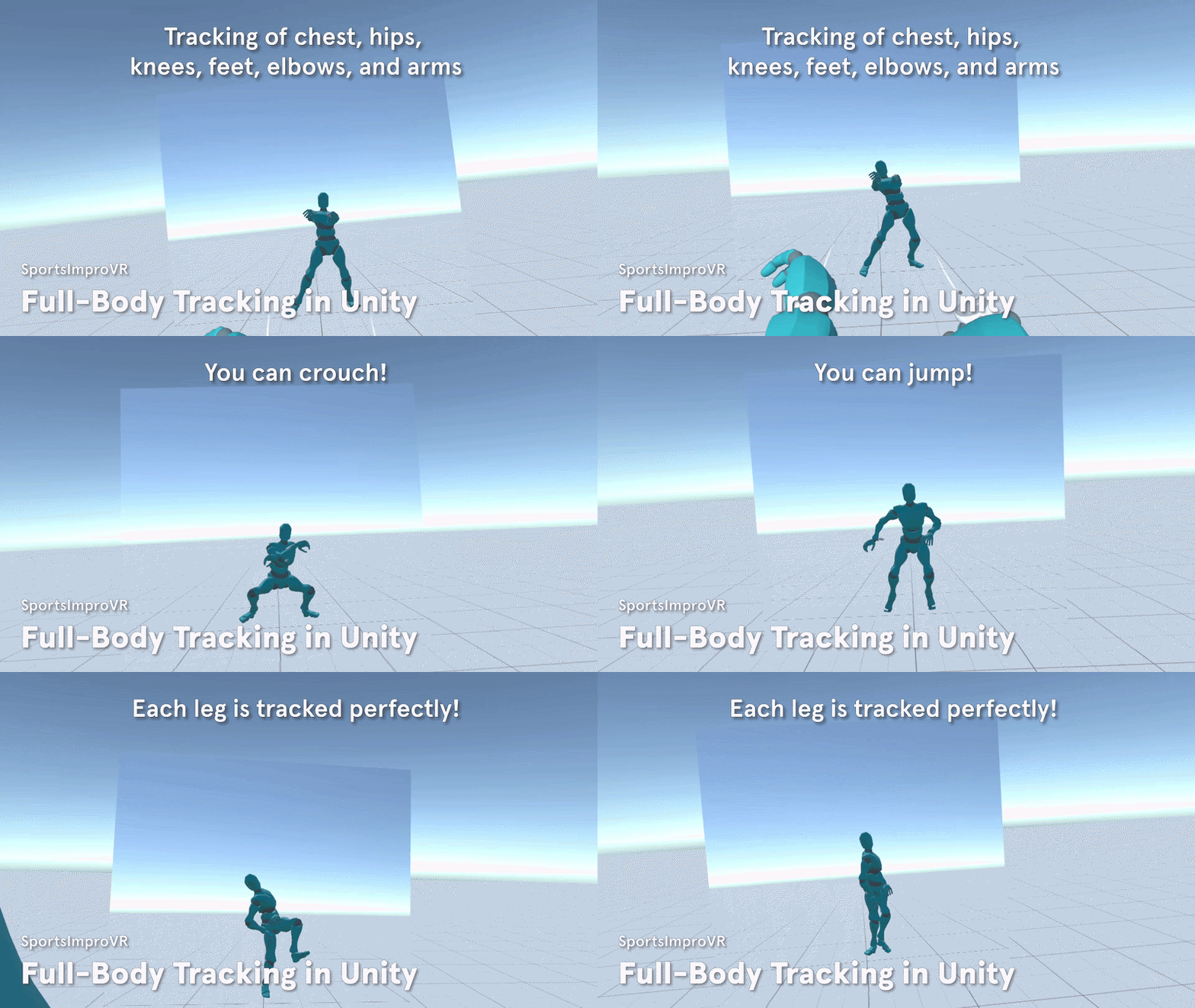
VR Full-Body Tracking is a Unity-based tracking solution that connects real body trackers to a Meta Quest VR application and uses them to drive a player avatar in real time.
The system receives position and rotation data from HaritoraX2 trackers through OSC, updates tracker target objects inside Unity, and applies those targets to a humanoid character using Unity IK / Final IK.
My goal was to bring the player’s real lower-body movement into VR sports training.
Before, the player avatar was mainly driven by the headset and controllers, which meant lower-body movement such as stepping, crouching, jumping and leg positioning was not properly visible in VR.
Now, the application can receive real tracker data, map it to an avatar, and make the virtual body follow the player’s real movement, opening the door for more accurate VR tennis training and future movement-based performance analysis.
⚙️ Challenge 1: Research of Existing Trackers
❓ What was the Problem?
The original goal was to bring full-body tracking into the SportsImproVR tennis application.
At first, I experimented with XSens DOT trackers. I successfully connected them and used their rotation data to drive objects in Unity. However, I discovered that XSens was not suitable for accurate positional full-body tracking.
The trackers were useful for orientation, but they could report movement even while lying still. After contacting XSens support, I learned that this was expected behavior because XSens DOT trackers were not designed for this type of positional tracking. Their acceleration data would drift over time.
This meant I had to stop treating XSens as the final solution and research the full-body tracking market properly.
💡 Solution. How Did I Approach the Problem?
I compared four main categories of full-body tracking systems:
Inertial Measurement Units — SlimeVR, HaritoraX2, Mocopi
IMU trackers use accelerometers and gyroscopes to estimate body movement.
They are affordable, portable and do not require external base stations. The downside is that they can suffer from drift and often need calibration or pose estimation software.
HaritoraX2 stood out because it provided Shiftall VR Manager, which could process tracker data and send a completed skeleton through OSC.
Electromagnetic Field — FluxPose
EMF tracking uses a generated electromagnetic field to determine tracker position.
It looked promising because it could provide absolute positional tracking without camera occlusion or Lighthouse base stations. However, at the time, it was still too risky and not production-ready enough for our needs.
Lighthouse — Vive Trackers, Tundra Labs
Lighthouse tracking was the highest-quality option in terms of accuracy and stability.
However, it required base stations, multiple trackers, accessories and a more complex room setup. For SportsImproVR, this was too expensive and not portable enough for a practical VR sports-training product.
Kinect / Camera-Based Tracking — Amethyst
Camera-based tracking was cheap and convenient because the player does not need to wear trackers.
However, it was the weakest option for fast tennis movement. It suffers from occlusion, limited tracking volume, and unreliable tracking when the player turns, moves quickly or leaves the camera view.
✅ Problem Solved
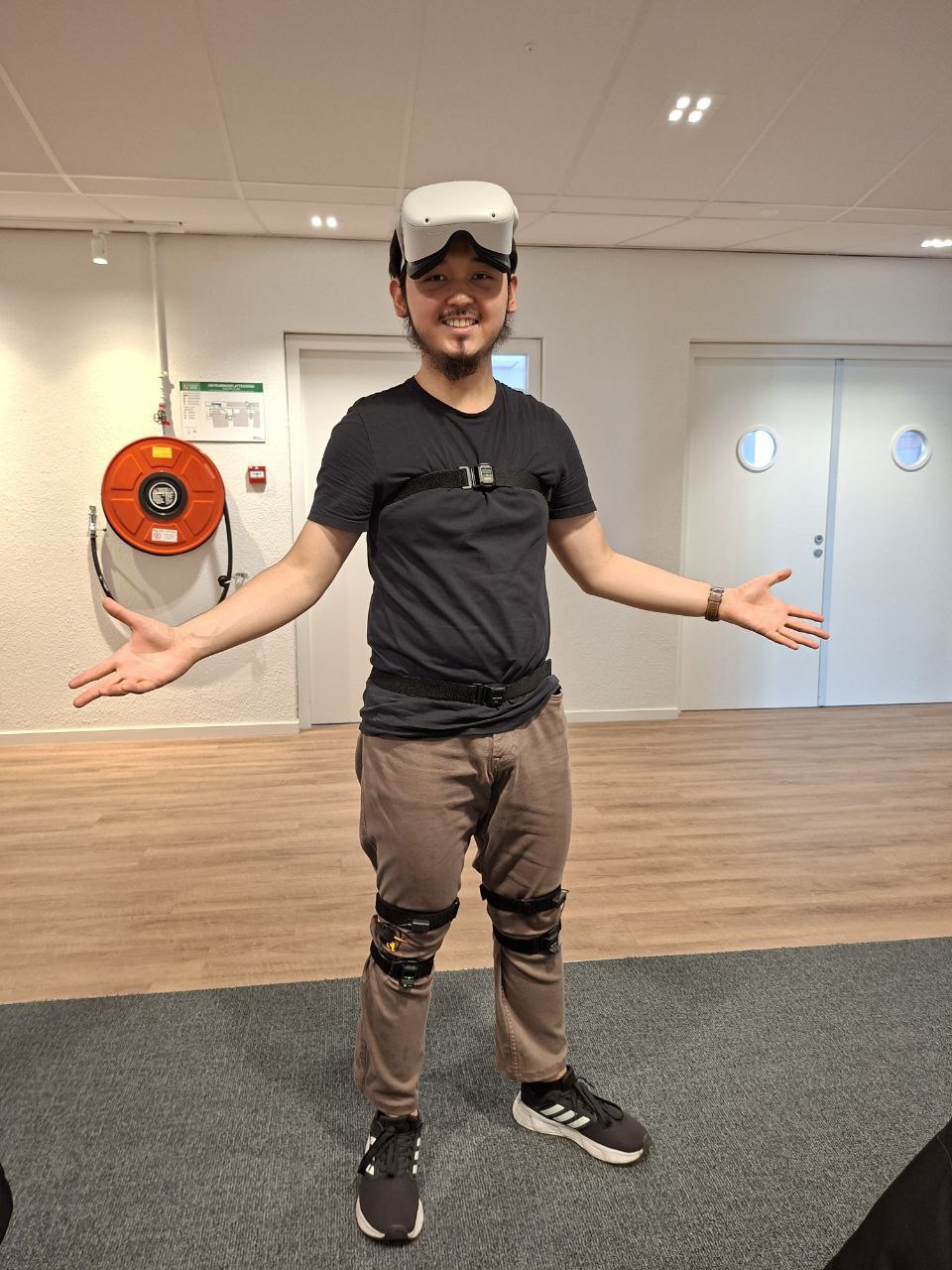
After comparing the options, I recommended HaritoraX2 as the best practical solution.
It was not the most accurate option overall, but it had the best balance for SportsImproVR:
- cheaper than Lighthouse,
- no external base stations,
- more production-ready than FluxPose,
- better suited than camera tracking,
- compatible with Shiftall VR Manager,
- and able to send skeleton data through OSC.
This research changed the direction of the project. Instead of continuing with XSens and fighting a hardware limitation, I moved the project toward a more practical HaritoraX2 + OSC pipeline.
⚙️ Challenge 2: Recreating VR-Chat’s Full-Body Tracking Solution
❓ What was the Problem?
After choosing HaritoraX2, I still had to solve the main technical problem:
How do I get tracker data into our own Unity application?
HaritoraX2 already worked with VR-Chat, but SportsImproVR needed full-body tracking inside its own standalone Unity VR application.
That meant I had to understand how VR-Chat’s tracking pipeline worked and recreate the useful parts of it in Unity.
💡 Solution. How Did I Approach the Problem?
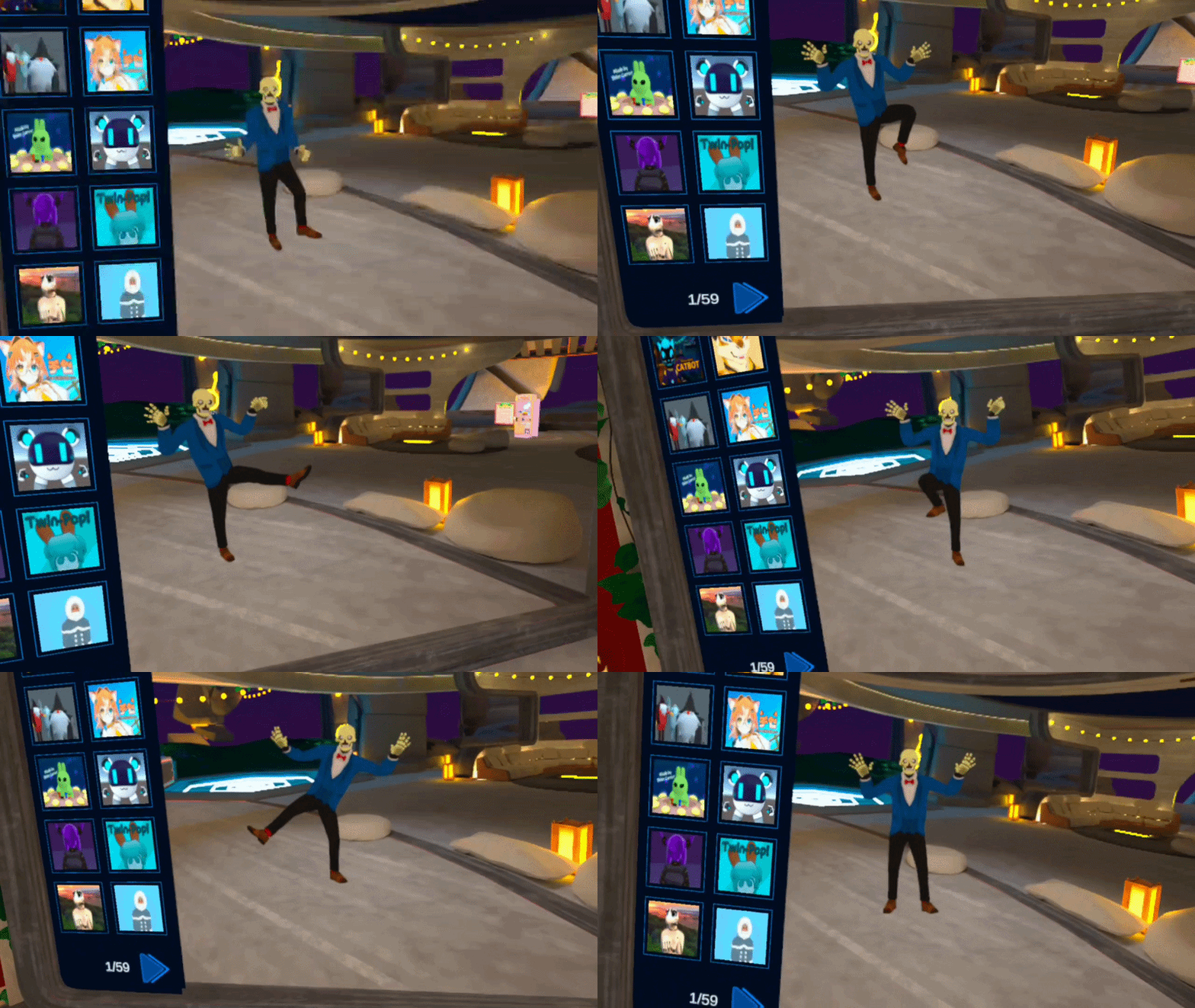
First, I tested HaritoraX2 in VR-Chat to verify that the trackers, phone, headset and OSC pipeline worked together.
Then I broke down the VR-Chat pipeline:
- HaritoraX2 trackers connect to a smartphone using Bluetooth.
- The phone runs Shiftall VR Manager.
- Shiftall VR Manager processes the raw tracker data into a body pose.
- The phone sends the tracking data over Wi-Fi using OSC.
- VR-Chat receives the OSC messages on the headset.
- VR-Chat applies the tracking data to the player avatar.
The key realization was that I did not need to build the whole tracker system myself. Shiftall VR Manager already handled Bluetooth, calibration, raw IMU data and pose estimation.
My job was to build the missing Unity-side piece:
an OSC receiver.
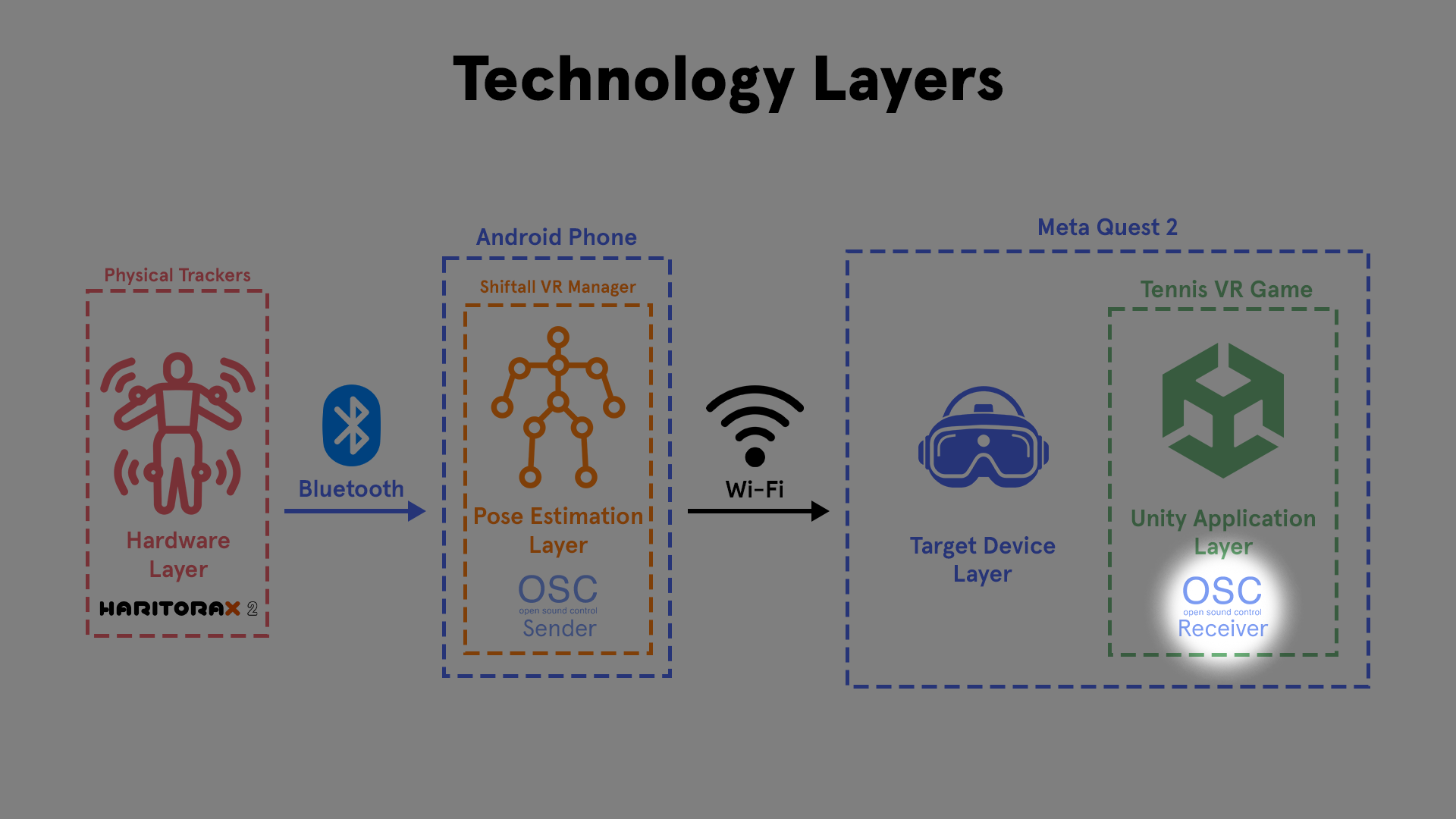
I first tried to remove the smartphone by installing Shiftall VR Manager directly onto the Meta Quest. This was technically possible because the Quest is Android-based, but performance was too poor. The tracking lagged heavily, so I switched back to the more reliable phone-based setup.
Then I debugged OSC in small steps.
I used TouchOSC and Protokol to send and inspect OSC messages. My first test was very small: send one float value from the phone and use it to move a cube in Unity.
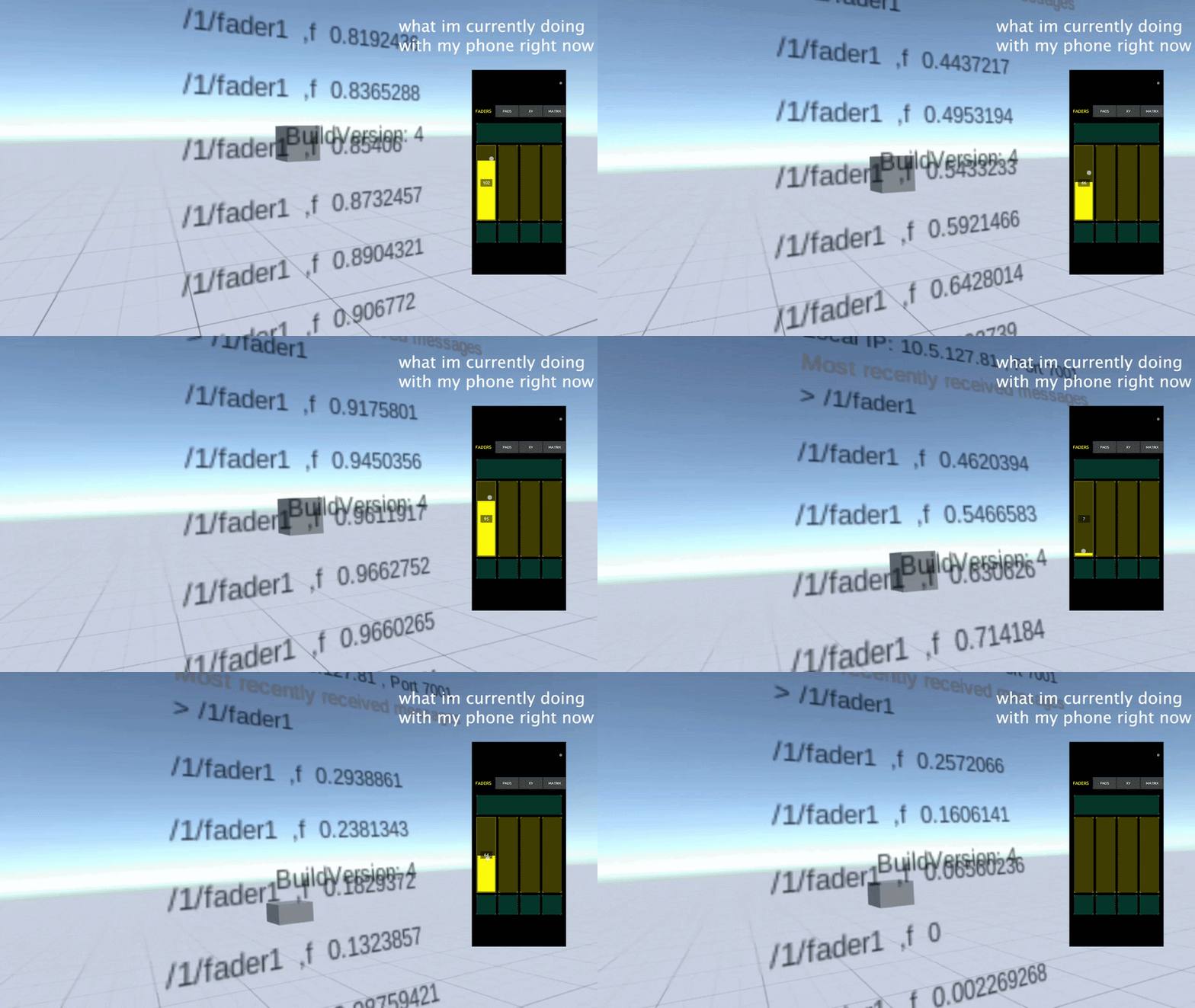
This proved that:
- the phone and headset could communicate,
- Unity could receive OSC data,
- and OSC values could drive objects in the scene.
After that, I recreated VR-Chat’s tracker address mapping and visualized the received tracker data as a simple “dancing cube man.”
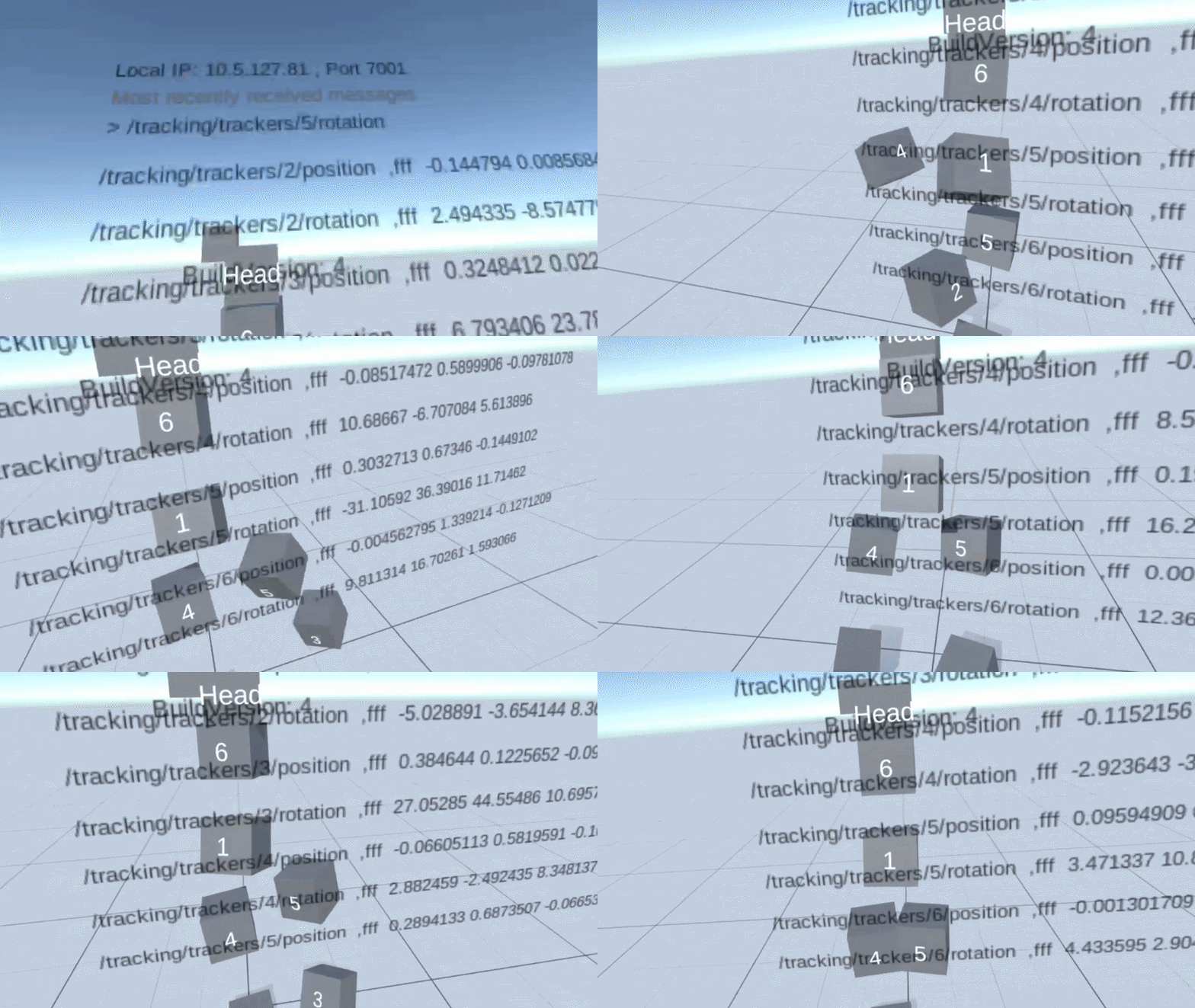
Only after confirming that the data worked on debug cubes did I apply it to a humanoid character using IK.
✅ Problem Solved
By the end, I had recreated the essential parts of VR-Chat’s full-body tracking pipeline inside Unity.
The final pipeline was:
- HaritoraX2 trackers captured the player’s movement.
- Shiftall VR Manager processed the data on a smartphone.
- The phone sent position and rotation data through OSC.
- My Unity receiver listened for the incoming tracker messages.
- The data was mapped to tracker targets in Unity.
- IK applied those targets to a character.
- The character followed the player’s real lower-body movement in VR.
This turned the project from a hardware experiment into a working Unity full-body tracking pipeline.
📉 Cost / Limitations / Tradeoffs
The biggest tradeoff was that I could not remove the smartphone from the pipeline. Running Shiftall VR Manager directly on the headset was cleaner in theory, but too slow in practice.
The system also depended on Wi-Fi networking. The phone and headset needed to be on the same network and able to communicate, which could fail on restricted networks such as Eduroam.
The IK solution also still needed tuning. Tracker data gives target points, but the final avatar pose depends on calibration, avatar proportions and IK settings.
Even with these limitations, the project proved the most important thing: real body trackers can drive a Unity character in a standalone VR sports-training application.
💥 Impact of Contribution
Before my contribution, full-body tracking was an unresolved research problem for SportsImproVR.
The company wanted to know whether external trackers could be used for VR tennis and baseball training, but the original XSens direction was uncertain and not suitable for positional tracking.
My contribution changed the project from:
“We do not know if this is technically possible.”
into:
“We have a working Unity full-body tracking pipeline.”
I researched tracker options, recommended HaritoraX2, recreated the VR-Chat-style OSC pipeline, debugged Android/Quest networking issues, mapped tracker data to Unity objects, and connected that data to a character through IK.
This made lower-body tracking possible inside the SportsImproVR application and created a foundation for future tennis movement analysis, such as foot placement, balance, split-step timing and player positioning.
📚 What I Learned
The biggest thing I learned is that a tracking system is not just “read tracker data and move a character.”
It is a full pipeline:
- hardware,
- calibration,
- pose estimation,
- networking,
- data parsing,
- coordinate mapping,
- IK,
- avatar behavior,
- product constraints.
At the start, I focused on making trackers work directly. Over time, I learned to think more like a systems engineer: which part of the pipeline should own which responsibility?
That changed my approach. Instead of building raw tracker processing myself, I used Shiftall VR Manager for pose estimation and focused my Unity work on receiving and applying OSC data.
I also learned to debug in layers. I did not immediately connect trackers to a full character. I first tested one OSC value, then one cube, then a cube body, and only then a humanoid character. This made the system much easier to understand and debug.
🎥 Video-to-FBX Converter Tool

The Video-to-FBX Converter Tool is a custom Unity editor tool that automates the process of converting video footage into FBX motion data.
The tool lets the user select one or multiple videos, send them to MoveAI, track each conversion with progress feedback, and automatically receive the generated FBX files inside the Unity project.
My goal was to turn a slow manual workflow into a simple Unity workflow.
Before, the user had to open MoveAI in a browser, upload a video, wait, download the result, clean up unnecessary files, and manually import the FBX into Unity.
Now, users can select videos, start conversion, continue working while the process runs in the background, and receive clean FBX output directly inside Unity.
Challenge 1: Integrating MoveAI Into Unity
❓ What was the Problem?
SportsImproVR’s original motion-capture workflow was manual and repetitive.
The user had to leave Unity, use the MoveAI website, download the result and manually import the FBX back into Unity. Since Unity was the final destination anyway, this created unnecessary friction.
💡 Solution. How Did I Approach the Problem?
I split the tool into two responsibilities:
- Unity owns the user workflow.
- Python owns the MoveAI API communication.
Unity handled the editor window, video selection, output folder, validation, progress display and final import.
Python handled MoveAI communication, uploading the video, waiting for processing, downloading the result and returning the FBX.
I first tested this with a tiny prototype: Unity ran a Python script that generated a simple text file. Once that worked, I replaced the test script with the real MoveAI conversion script.
✅ Problem Solved
The tool successfully converted video footage into FBX motion data from inside Unity.
Instead of using MoveAI manually, the user could select a video in the Unity editor, click convert, and receive the FBX output inside the project.
📉 Cost / Limitations / Tradeoffs
The tool depended on Python and the MoveAI API, so it was not fully self-contained. It also still depended on MoveAI’s processing time and pricing. One test video took around 15 minutes and cost around $0.52 to process.
Challenge 2: Keeping Unity Responsive During Long Conversions
❓ What was the Problem?
The first version worked, but conversions could take a long time. If the conversion ran on the main editor thread, Unity could become blocked for several minutes.
A tool that saves time should not freeze the editor.
💡 Solution. How Did I Approach the Problem?
I moved conversions into background tasks.
Instead of treating a conversion as a single button press, I treated each conversion as a job with its own input, output, progress, status and result.
The editor UI displayed the current state of each job, while the slow conversion work ran in the background.
✅ Problem Solved
Unity stayed usable while conversions ran.
The user could continue working in the editor and still see what each conversion was doing through progress bars and status messages.
📉 Cost / Limitations / Tradeoffs
Background processing made the tool more complex. I had to manage job state, UI updates, progress tracking and error handling. I also had to be careful because Unity APIs are not always safe to call from background threads.
Challenge 3: Supporting Multiple Videos and Parallel Conversion
❓ What was the Problem?
A real workflow often involves multiple videos. If each video converts one after another, waiting time grows quickly.
Three videos that take five minutes each would take around fifteen minutes sequentially.
💡 Solution. How Did I Approach the Problem?
I managed parallelism from Unity instead of hiding it inside Python.
Each selected video became its own conversion job. This allowed Unity to show separate progress, status and errors for every video.
✅ Problem Solved
Multiple videos could be converted at the same time.
This reduced a batch of three five-minute conversions from around fifteen minutes to around five minutes, depending on MoveAI processing and external limits.
📉 Cost / Limitations / Tradeoffs
Parallel conversion introduced more complexity. Some jobs may fail while others succeed, downloads may finish at different times, and too many parallel conversions could hit API or performance limits.
Challenge 4: Making the Tool Usable for Production
❓ What was the Problem?
The first version proved that conversion worked, but my supervisor’s feedback showed that it still needed to behave like a real production tool.
The tool needed to support file-system video selection, avoid overwriting original files, clean up unnecessary output, run in the background and support multiple conversions.
💡 Solution. How Did I Approach the Problem?
I improved the interface and workflow.
Users could select videos directly from the file system, choose an output folder, see warnings for missing API keys or inputs, and monitor each conversion separately.
I also changed the UI so multiple selected videos appeared in a clear list, and the main actions were easy to find.
✅ Problem Solved
The tool became easier and safer to use repeatedly.
Users no longer had to copy videos into Unity first, guess what was missing, or manually manage unnecessary files. The tool guided them through the conversion process.
📉 Cost / Limitations / Tradeoffs
The improved UI required more editor code and more maintenance. However, this was worth it because usability was what turned the tool from a prototype into a practical internal tool.
💥 Impact of Contribution
Before my contribution, converting video into motion data was a manual multi-step workflow across MoveAI, the browser, the file system and Unity.
After my contribution, the workflow started and ended inside Unity.
The tool allowed users to select videos, run conversions in the background, process multiple videos in parallel, track progress per video, and receive clean FBX output directly in the project.
The biggest improvement was that a slow repetitive production task became a Unity-integrated tool. It removed manual friction, reduced waiting time, supported batch conversion, and made the process easier to trust.
📚 What I Learned
I learned that a good tool does not always need to solve the entire technical problem itself. Sometimes the best tool is a bridge between existing systems.
MoveAI already solved the hard motion-capture problem. My job was to make that power accessible from the team’s actual working environment: Unity.
I also learned that editor tools need to respect the user’s time. A tool can work technically, but still feel bad if it freezes, gives no feedback, or forces the user to wait without explanation.
The most useful mental model was treating each conversion as a job. Once every video had its own input, output, state, progress and result, the tool became much easier to expand into background processing and parallel conversion.
🔄 Future Improvements
Future improvements could include:
- automatic Python environment detection,
- built-in API key management,
- drag-and-drop video selection,
- better error reporting,
- automatic retry logic,
- cancellation per job,
- maximum parallel conversion limits,
- estimated time remaining,
- persistent job history,
- and a cleaner separation between UI, job management, Python execution and file handling.
👤 Zhangir After the Project
By the end of the internship, I had gone from having no VR experience to building real Unity tools and XR prototypes for SportsImproVR.
I created my first professional Unity tools, researched full-body tracking hardware, worked with Meta Quest, Android builds, Bluetooth LE, OSC networking, tracker calibration, Unity IK and Final IK.
The original goal was to investigate whether full-body tracking could work for SportsImproVR’s VR training applications. I achieved that goal by building a working pipeline that received tracker data, mapped it into Unity, and used it to drive a character.
What I am most proud of is that I turned unfamiliar and uncertain problems into concrete working systems. At the start, I did not know how VR-Chat’s full-body tracking worked, how OSC worked on Quest, or how to connect tracker data to a Unity character. Step by step, I broke the problem down until it became understandable and solvable.
This project changed how I think as an engineer. I started thinking less in terms of isolated features and more in terms of systems, pipelines and ownership of responsibilities.
I started as a student who had only made tools in university. I ended as someone who had built professional Unity tools, researched XR hardware, and developed a working VR full-body tracking prototype.
This project shows that I can investigate unclear technical problems, compare solutions, make engineering tradeoffs, and build practical tools that move a project forward.